1
Open My machines
Log in and open My machines from My Dashboard. You can search by title, by MachineLinker ID (for example ML-12345) or by your own reference.
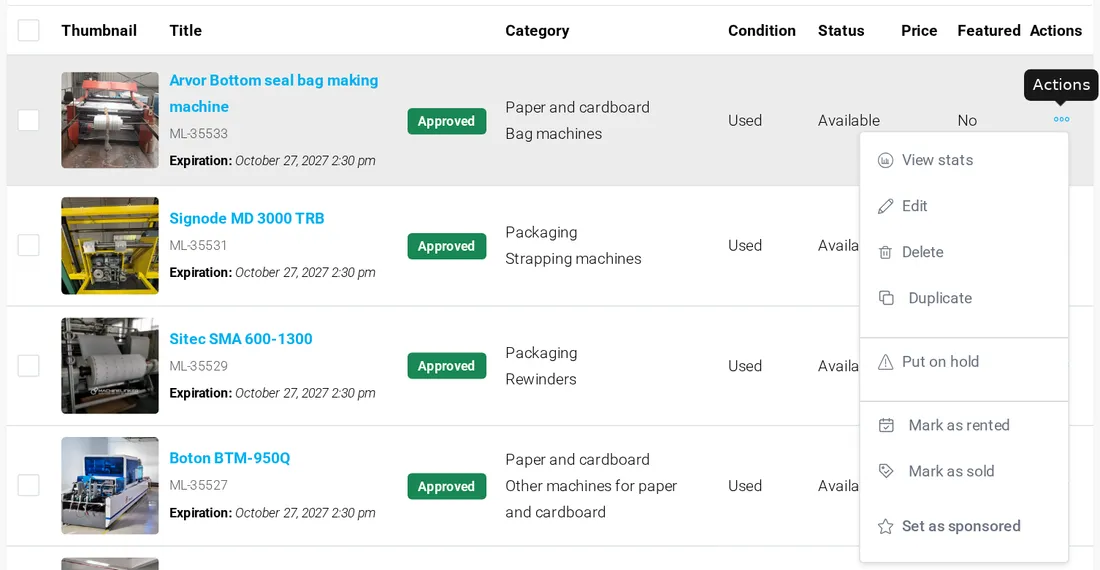


All your machines are in My machines: from there you edit them, highlight the best ones and keep the list up to date.
Log in and open My machines from My Dashboard. You can search by title, by MachineLinker ID (for example ML-12345) or by your own reference.
Click the three dots of a machine and choose Edit. Change what you need and click Save changes.
When you sell a machine, choose Mark as sold: buyers see that it is no longer available. For rental machines use Mark as rented and, later, Mark as available.
With a paid plan, choose Set as sponsored: the machine is shown first in its category, in search results and on your company page, and in rotation on the home page. Remove from sponsored frees the place for another machine.
Put on hold takes a machine offline without deleting it; Go live publishes it again.
Duplicate copies a machine, so you can add a similar one quickly. Change data and photos before you publish the copy.
View stats shows the visits to the machine page.
Delete removes the machine permanently: it cannot be restored. If you only want to stop showing it, use Put on hold or Mark as sold.
Drafts are in My machines too. Open one with Edit, complete it and click Submit machine.
It depends on your plan: from 3 with STARTER to 100 with ENTERPRISE. See Plans and payment.
Buyers contact you directly, with no commission.
Add your first machine for free